SAP systems rarely work in isolation. A typical SAP S/4HANA environment may exchange data with CRM applications, banks, warehouse systems, logistics providers, suppliers, HR applications and many other SAP and non-SAP systems.
All these applications need to communicate reliably with SAP. That means when an organisation implements S/4HANA, upgrades its systems, changes an interface or migrates from one integration platform to another, testing the SAP system alone is not enough. The integrations also need to be tested. And this is where things can become complicated.
In this article, we will look at how SAP integration testing normally works, the challenges organisations face, the concept of service virtualization, and how tools such as Int4 Suite can help automate integration and API testing.
What is SAP integration testing?
SAP integration testing is the process of verifying that data can move correctly between SAP and the other applications connected to it.
Let us take a simple example.
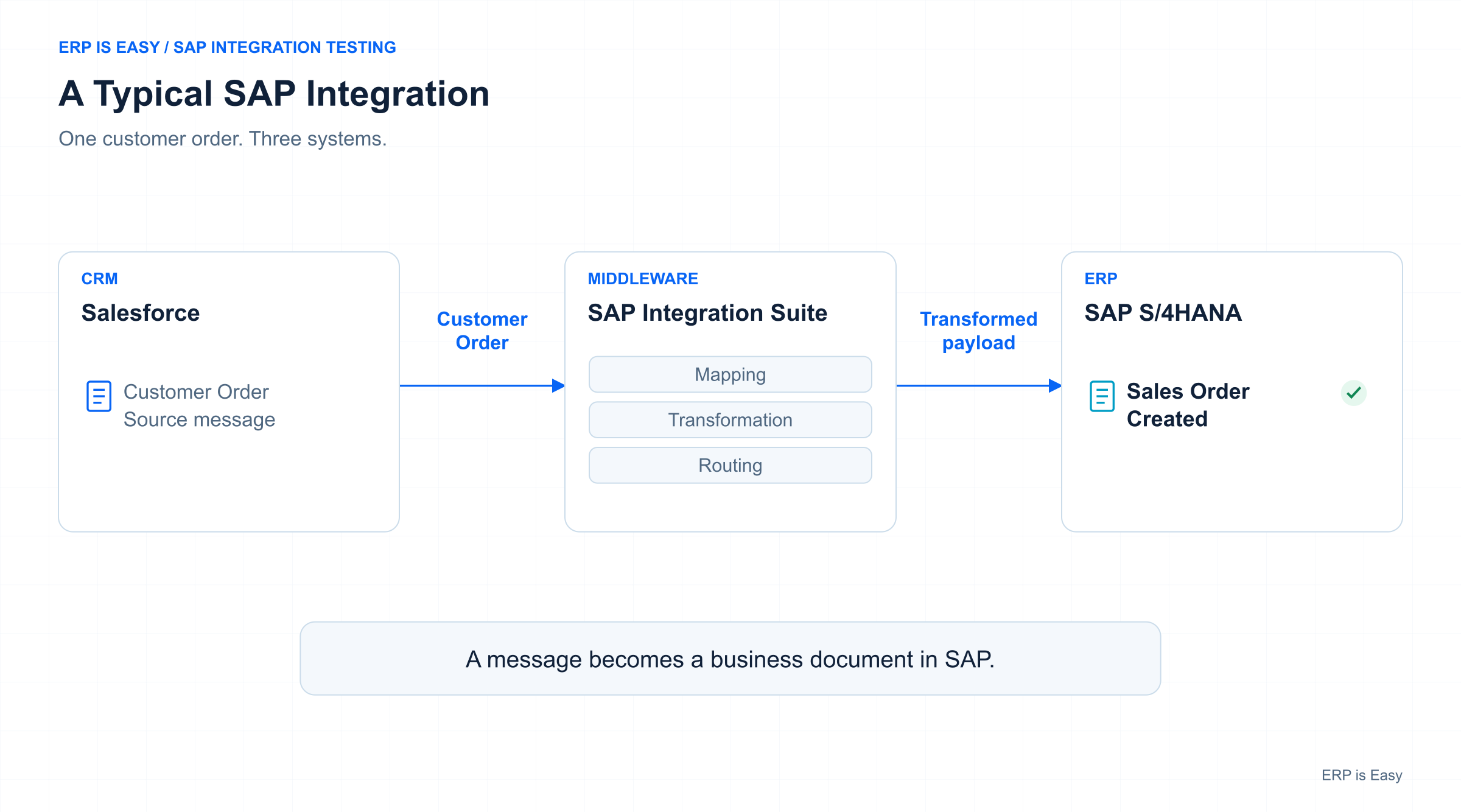
Imagine an organisation uses Salesforce as its CRM system and SAP S/4HANA as its ERP system. A customer places an order in Salesforce. That order then needs to be sent to SAP S/4HANA so that a sales order can be created. In many organisations, Salesforce may not communicate directly with S/4HANA. There may be an integration platform in between, such as SAP Integration Suite.
The flow could look like this:
Salesforce → SAP Integration Suite → SAP S/4HANA
Salesforce sends the order. SAP Integration Suite receives the message, applies the required mapping, routing or transformation, and sends the resulting message to S/4HANA. S/4HANA then processes the message and creates the sales order. That is one integration.
In a large enterprise, there may be hundreds or thousands of interfaces processing different types of transactions every day.
Why is SAP integration testing difficult?
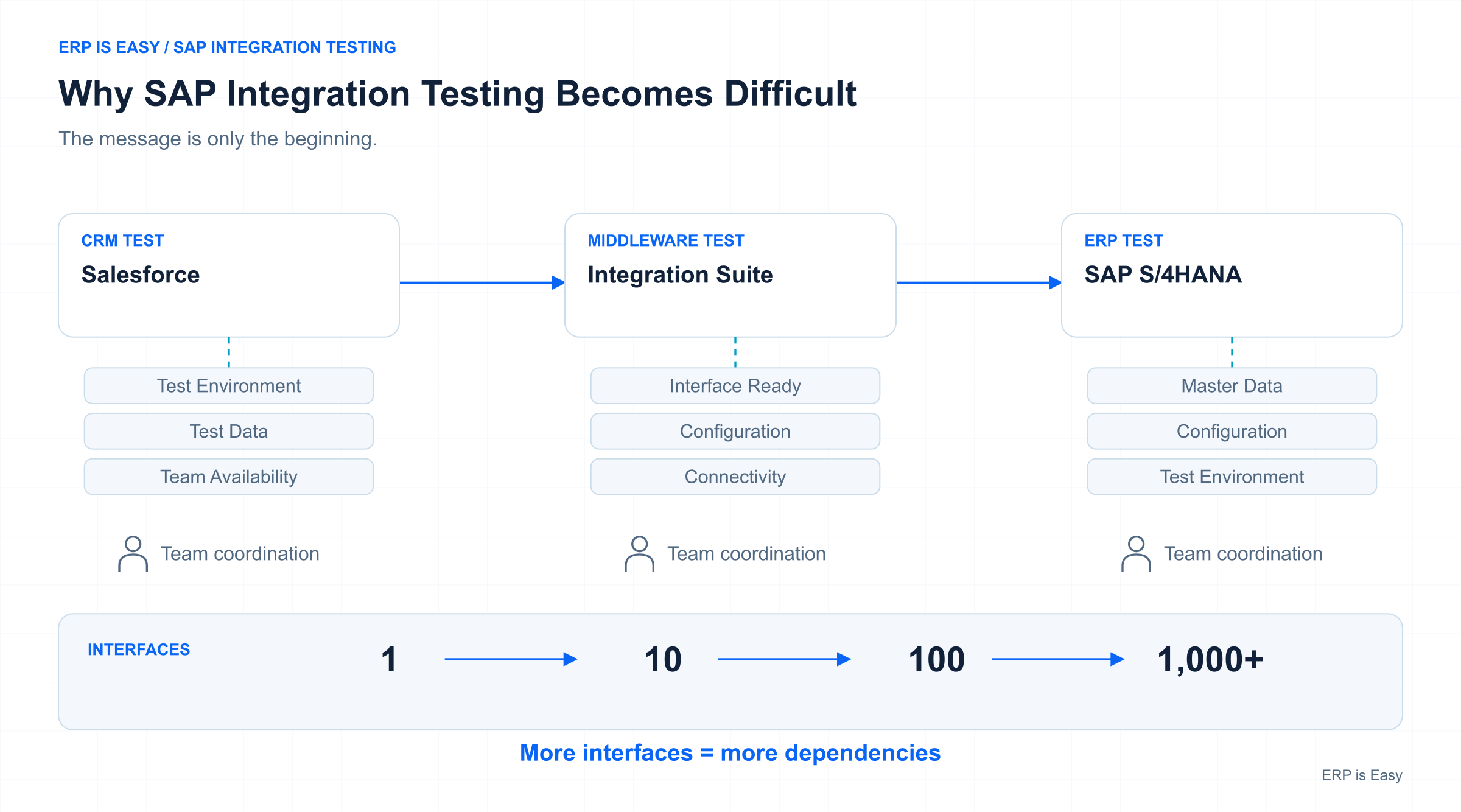
Testing one interface once may not sound particularly difficult. Let us use the same example. If a change is made to S/4HANA or to an integration flow in SAP Integration Suite, the organisation may want to test whether the sales-order interface still works. The obvious approach is to ask Salesforce to send another test order.
The message travels through Integration Suite, reaches S/4HANA, and the team verifies whether the sales order was created correctly. But several things need to happen before that test can even begin. The Salesforce test environment must be available. The correct test data needs to exist in Salesforce. Someone may need to trigger the transaction.
The Integration Suite environment needs to be available and correctly configured. S/4HANA needs the appropriate master data and configuration. Several teams may also need to coordinate with each other. For one interface, this may be manageable. For hundreds of interfaces, it quickly becomes a much larger exercise.
Test data creates another challenge
Even when all the connected systems are available, organisations still need suitable test data. A testing team might manually create five or ten sales orders. That may cover the most common business scenarios. But production systems do not process only common scenarios.
There may be:
- a particular customer using an unusual combination of materials
- an EDI partner sending a different message structure
- a transaction that occurs only at month end
- a specific routing condition
- an unusual business document
- an edge case that happens only occasionally
Many of these scenarios may already have occurred in production. The challenge is recreating them accurately in a test environment. This becomes particularly important during a major transformation such as an ECC to S/4HANA migration.
Rather than testing only a small number of manually created scenarios, an organisation may want to know whether the new S/4HANA environment can process the same real-world transactions that the existing production environment processes today.
This is where historical production data becomes extremely valuable.
What is service virtualization?
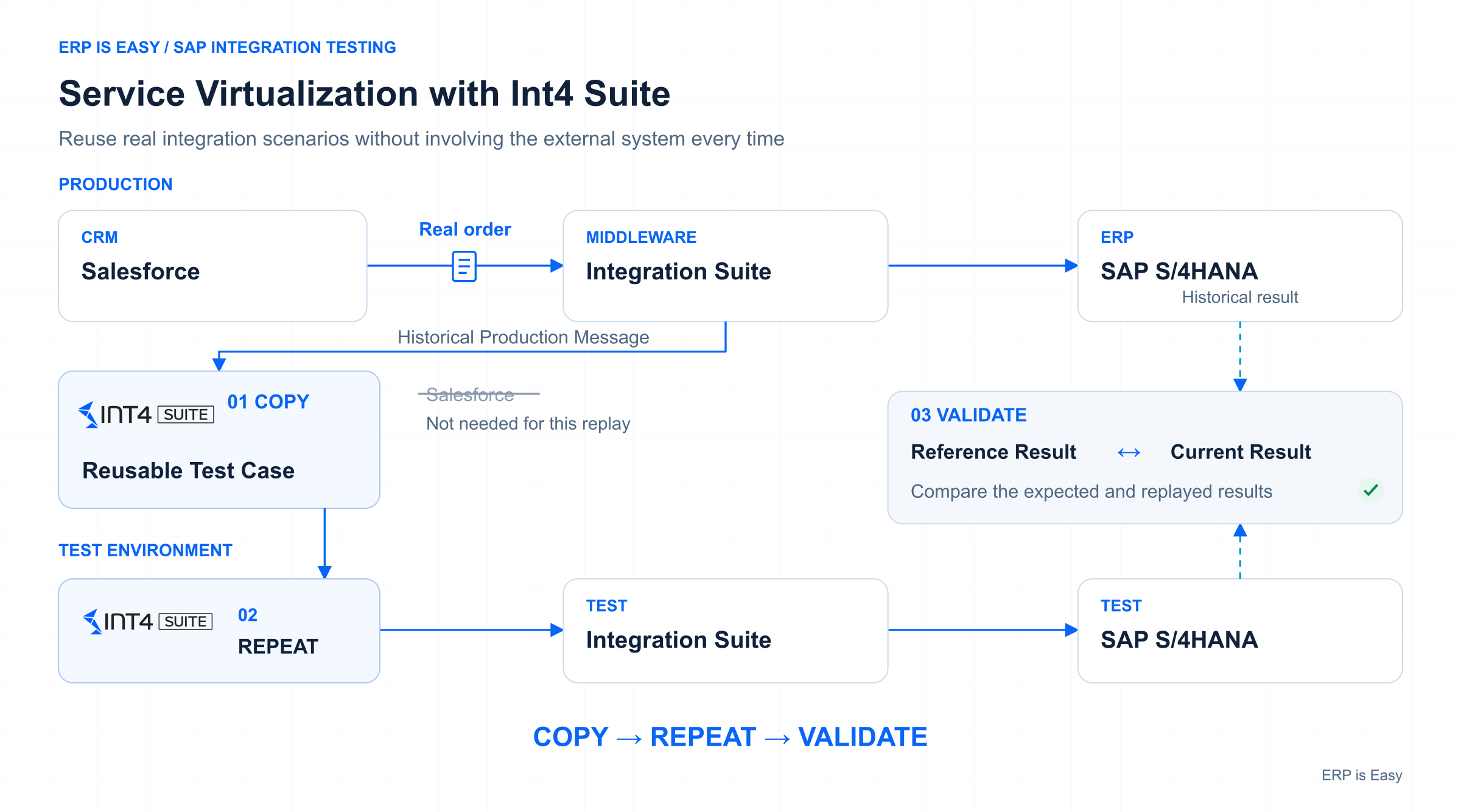
One way of reducing dependency on external applications is through service virtualization. Let us go back to the Salesforce example. A real customer order has already travelled from Salesforce through SAP Integration Suite into SAP. The message that was processed already exists.
Instead of asking Salesforce to create another transaction every time a test needs to be performed, the original message can be stored and reused.
During testing, a tool can simulate the behaviour of Salesforce and send that message into the test integration environment.
The flow changes from:
Salesforce → Integration Suite TEST → S/4HANA TEST
to:
Virtualised External System → Integration Suite TEST → S/4HANA TEST
The external application no longer needs to participate in every individual test. This is the fundamental idea behind service virtualization. It allows organisations to decouple parts of the testing process from connected third-party systems.
What is Int4 Suite?
Int4 Suite is a software suite designed for testing SAP integrations and APIs. One of its main capabilities is service virtualization. Rather than depending on an external system every time a test is executed, Int4 Suite can use historical messages that have already been processed through the integration platform and save them as reusable test cases.
Those messages can then be replayed against a non-production environment.
Int4 describes the basic approach as:
Copy → Repeat → Validate.
In simple terms:
Copy: collect an existing message and use it as a test case.
Repeat: replay the message against another environment.
Validate: compare the new result against the expected or reference result.
How Int4 APITester works?
Int4 APITester is one of the products within Int4 Suite. It is designed to test both the integration layer and, where required, the SAP backend. Suppose an original sales-order message was processed through SAP Integration Suite. Int4 APITester can retain that original processing result as the reference. The same scenario can then be executed again against a test environment.
Int4 APITester can compare the result from the new execution against the original reference.
This means the test is not limited to simply answering:
Did the message get sent?
It can also answer:
Was the message processed in the expected way?
And:
Did SAP create the expected business document?
Integration message validation
The first level of validation happens at the integration layer. For example, an inbound order may pass through SAP Integration Suite and generate an XML message.
Int4 APITester can compare the message generated during the current execution against the reference message.
This comparison can identify differences such as:
- changed values
- missing fields
- additional fields
- changes in message structure
Expected differences can also be handled differently.
For example, a new document number may naturally be generated during every execution.
The important point is that the comparison is automated rather than requiring someone to manually open two XML payloads and compare them line by line.
SAP backend document validation
Integration testing does not necessarily end when a message successfully reaches SAP.
Suppose the integration is expected to create a sales order. It is not enough to know that a sales order exists.
The organisation may also want to verify that the relevant business data within that sales order is correct. Int4 APITester can perform SAP backend validation by comparing data from the newly created business document against the reference document.
For a sales-order scenario, this may include areas such as:
- sales document header data
- item data
- partner information
- business data
This means the test can validate both the technical integration message and the resulting SAP business document.
Where does Int4 Suite sit in an SAP landscape?
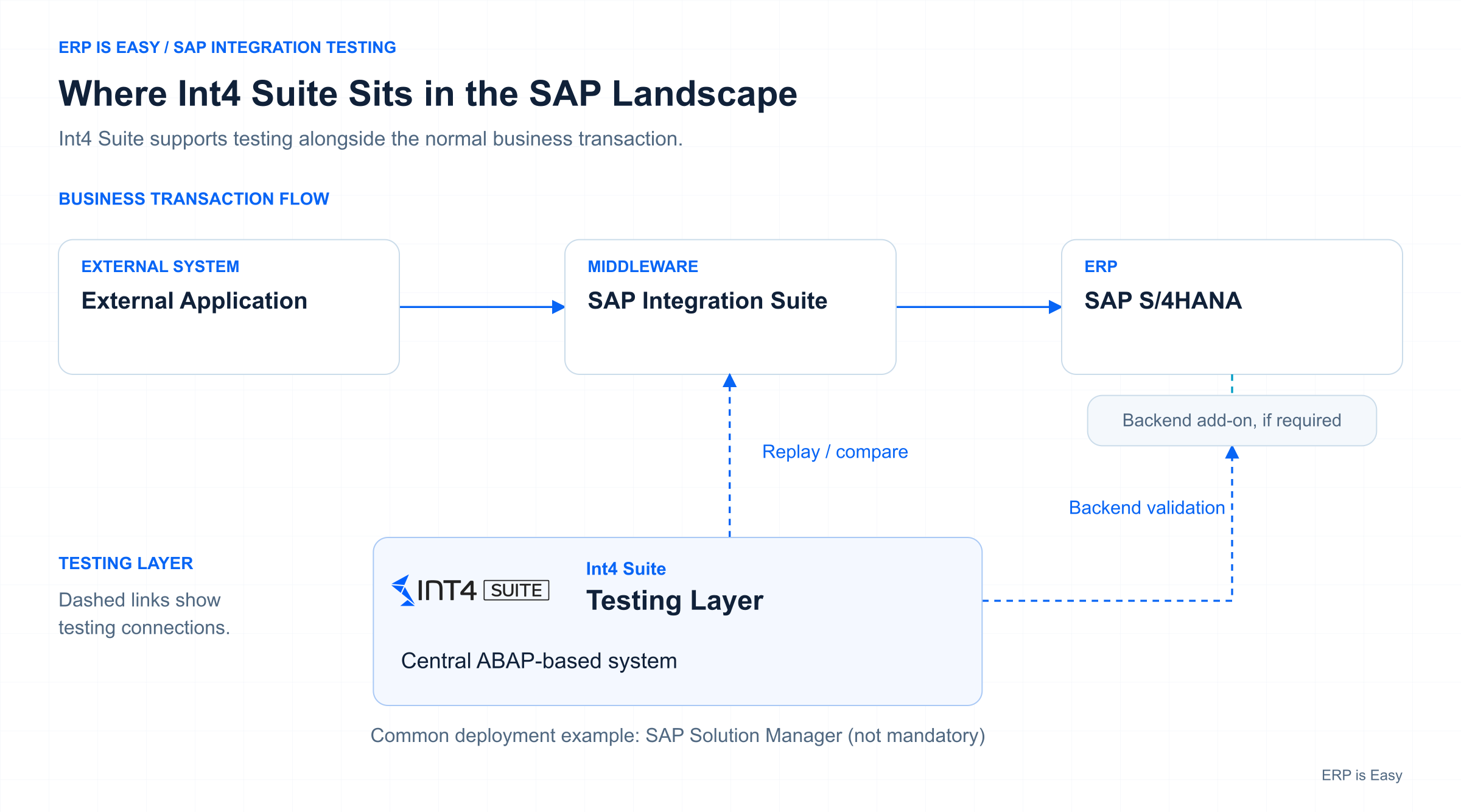
Int4 Suite is not another middleware platform placed between an external application and SAP. The normal business transaction continues through the organisation’s existing integration architecture.
Int4 Suite is an SAP ABAP add-on. It can be installed centrally on an ABAP-based SAP system. SAP Solution Manager is one common deployment option mentioned in the Int4 material. The central Int4 Suite installation can then connect to the relevant integration platforms and SAP backend systems.
Where SAP backend validation is required, Int4 Suite add-on components can also be deployed on the relevant ECC or S/4HANA systems.
So, the simplest way to think about Int4 Suite as a testing layer that sits alongside the SAP integration landscape rather than inside the normal business transaction flow.
Why does this become valuable at scale?
Running one automated sales-order test is useful. But the larger value appears when the same principle is applied across many interfaces and many business scenarios.
Take an ECC to S/4HANA transformation.
The existing production landscape is already processing thousands of real business transactions. Rather than manually recreating every test scenario, historical transactions can be collected and converted into reusable test cases. Those test cases can then be executed against the new environment.
Once the test repository has been created, the same scenarios can also be reused after future changes or releases.
This makes the approach useful for:
- ECC to S/4HANA transformations
- regression testing
- SAP Integration Suite changes
- integration platform migrations
- validating large numbers of interfaces repeatedly
Int4 also describes the use of automated and continuous regression testing as one of the main use cases for this approach.
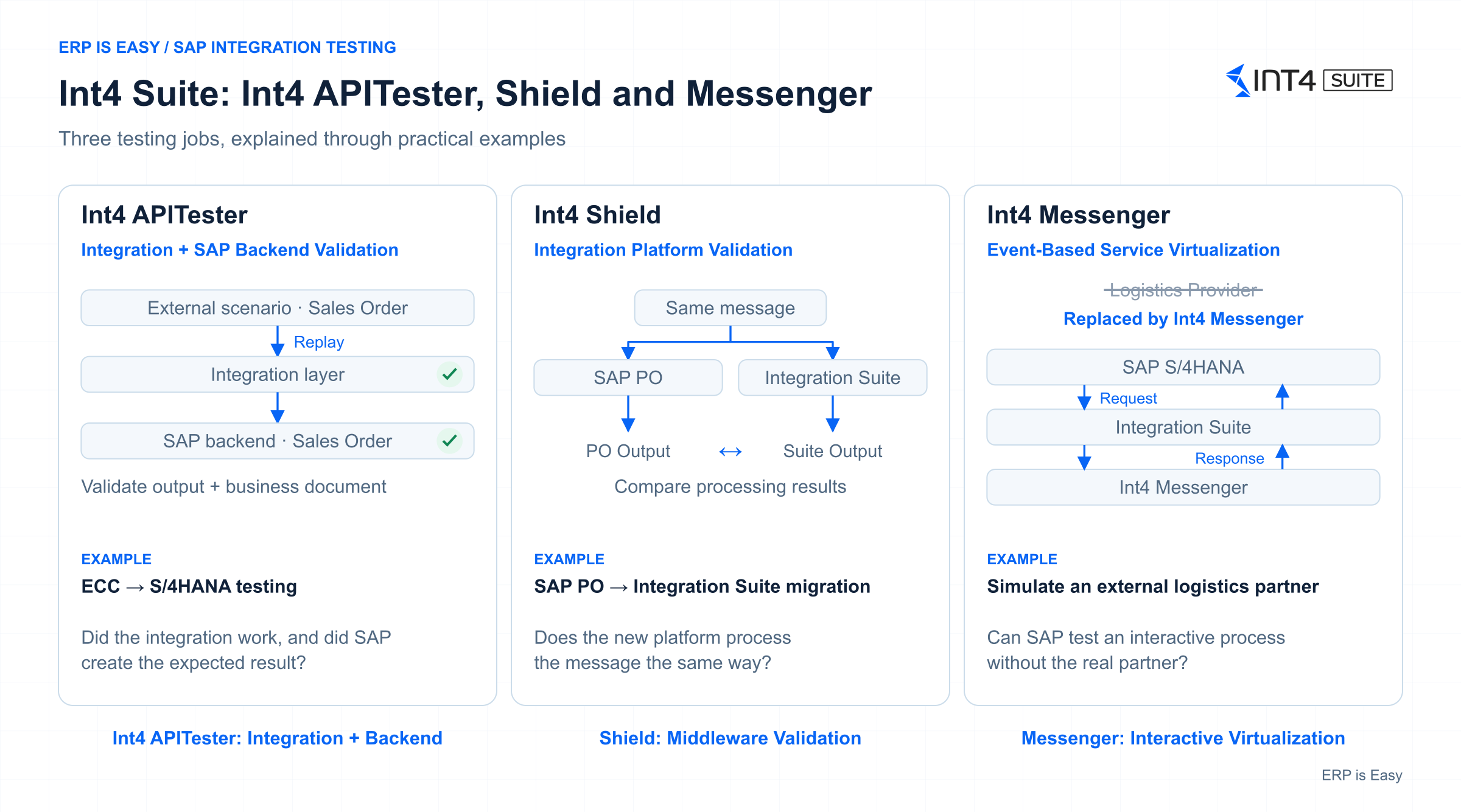
Int4 APITester vs Int4 Shield vs Int4 Messenger
Int4 APITester is only one part of the broader Int4 Suite. The suite also includes other products that solve slightly different integration-testing problems.
Int4 APITester
Int4 APITester covers both integration-platform testing and SAP backend validation.
A good example would be an ECC to S/4HANA transformation where an organisation wants to replay existing integration scenarios and check whether the new S/4HANA environment produces the expected result.
In simple terms:
Did the integration work, and did SAP produce the correct business document?
Int4 Shield
Int4 Shield is more focused on the integration or middleware layer. A good example is a migration from SAP PO to SAP Integration Suite. Suppose an interface currently runs through SAP PO. The organisation wants to migrate that interface to Integration Suite.
The important question may be:
Does SAP Integration Suite process the same message in the same way SAP PO does today?
The existing message can be reused and the outputs from the old and new integration platforms can be compared.
The focus here is on validating the integration-platform migration rather than validating the SAP backend itself.
Int4 Messenger
Int4 Messenger focuses on event-based service virtualization. Sometimes an integration is not simply a one-way message.
For example:
SAP → Integration Platform → Logistics Provider
The logistics provider may later need to respond:
Logistics Provider → Integration Platform → SAP
During testing, organisations may not want to depend on the real logistics provider every time. Int4 Messenger can simulate the partner behaviour and generate the expected responses back into the SAP landscape.
So, while Int4 APITester may replay and validate integration scenarios, Int4 Messenger can simulate more interactive behaviour between SAP and external systems.
Does service virtualization replace end-to-end testing?
No.
This is an important distinction.
Suppose SAP sends a transaction through Integration Suite to an external application.
Int4 APITester can validate the SAP side and the processing within the integration layer. But if the real external system is being virtualised, the test cannot confirm what happened inside that external application.
The message may have been sent correctly, but the receiving application may still fail during its own processing. Int4 therefore recommends retaining some genuine end-to-end testing with the real external systems. The objective of service virtualization is not to eliminate every real end-to-end test.
The objective is to reduce unnecessary dependency on external systems for repetitive testing. An organisation can automate a large proportion of integration regression scenarios and then use targeted end-to-end tests where real external-system validation is required.
Final thoughts
SAP integration testing becomes difficult not because sending one message from one application to another is particularly complicated. The real challenge comes from everything around it.
The number of interfaces.
The number of systems involved.
Dependencies on other teams.
Test-environment availability.
Creating realistic test data.
And repeating the same testing whenever the SAP landscape changes.
Service virtualization provides a practical way to reduce some of these dependencies.
Instead of recreating every scenario from scratch, organisations can reuse real integration scenarios, replay them against new environments and automatically validate the results.
That is the core idea behind Int4’s approach:
Copy → Repeat → Validate.
For large SAP transformation programs, integration-platform migrations and ongoing regression testing, this can make integration testing far more repeatable and scalable.



Leave a Reply