There are two things you need to understand when it comes to SAP change management.
One is the organisation change management that focuses on the human aspect of change, addressing how people and teams transition from current to desired states. It involves communication, training, and support strategies to ensure that employees embrace and adopt new processes, technologies, or organizational structures.
The other one is the technical change management that deals with the systematic approach to managing technical changes within the SAP environment.
In this blog, we are going to focus on the technical change management aspect in SAP.
The topics of the blog is as follows
- Introduction to SAP Technical Change Management
- What is a Transport?
- Difference between customising and workbench changes.
- What is an SAP dual landscape and what is a retrofit transport?
- Key points to consider when it comes to managing SAP technical changes.
If you are new here, my name is Aroon and I make YouTube videos and write blogs about the SAP topics. Please subscribe to my YouTube channel and the blog to keep up to date.
When an SAP system is newly implemented or when you are operating in a BAU environment, there will be constant requirements to make changes to the SAP solution. Those changes are developed in the development system and moved across the landscape.
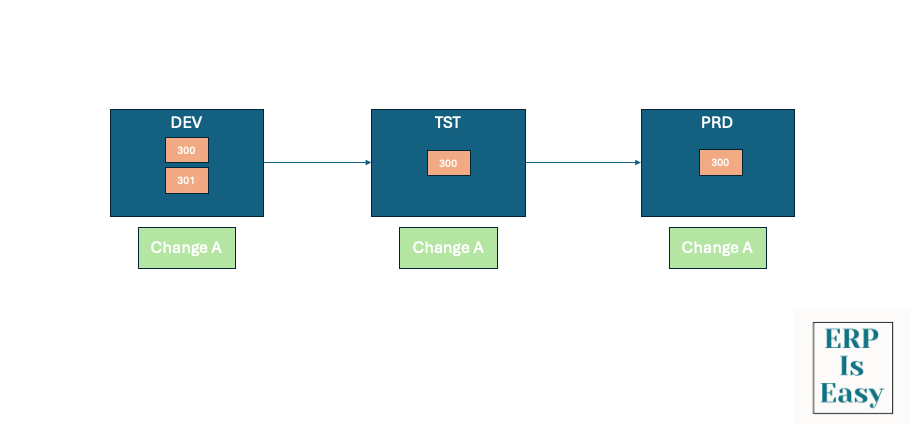
Usually, an SAP landscape will contain three systems. One is the development system where the changes are made or programs are developed. Then those changes will be moved in to a quality assurance system. Testing will happen in the quality assurance system. Once the testing is completed and passed, the same changes will be moved into the production system. This way, we can ensure that the SAP landscape is synchronised and all the changes that are required to be made are moved through the landscape in a controlled manner.
There can be multiple clients available within the same SAP system which can be used for various purposes. For example, client 300 can be used as a development client in the development system and client 301 can be used as a unit test client.
What is a Transport?
A transport is a virtual container that will capture the changes that are made in the development system and move those changes to other SAP systems in the landscape.
When a transport request is released in the SAP system, two types of files are created: the cofile (control file) and the data file. These files play crucial roles in the SAP transport process:
The cofile contains metadata and control information about the transport request. This includes details such as the type of objects being transported, their source and target systems, and instructions for the transport system on how to process the transport.

Cofile is stored in the /usr/sap/trans/cofiles directory on the SAP file system.
The data file contains the actual data or objects that are being transported. This includes source code, configuration settings, and any other data that needs to be moved from one system to another.
Data file is stored in the /usr/sap/trans/data directory on the SAP file system.
When the changes are moved from one SAP system to the other, the cofiles and the data files associated to those transports are also moved to the respective SAP system at the operating system level.
There are two types of changes in SAP. One is customising and the other is workbench. Customising changes are related to the configuration settings of an SAP system. These changes typically affect how the system behaves and operates based on business requirements. They are often client-specific, meaning they apply only to a particular client within the SAP system. For example, creating a new company code is a customising change.
Let’s see how it’s usually done in the SAP System.
- Navigate to transaction SPRO and open the SAP Reference IMG.Go to Enterprise Structure -> Definition -> Financial Accounting -> Define Company Code.Click on “New Entries” and enter the details for the new company code, such as company code, company name, city, country, currency, and language.Save the entries.
- Transport Request: Upon saving, a customizing transport request is created to transport this configuration to other systems.
Say for example, you want to create a new report in the system. Go to transaction SE38 which is the ABAP workbench transaction, create a new report, and once you save and activate the report, the system will ask you to capture those changes in a workbench transport request. That transport then can be moved to other SAP systems. Workbench transports are applied to all the clients in the SAP system irrespective of which client it is imported into.
These are the SAP transactions that are used to manage the transport management system in SAP.
STMS – This is the central transaction for configuring and managing the transport landscape. It allows you to configure transport routes, import queues, and monitor transport logs.
STMS_IMPORT – This transaction is used specifically to import transport requests into a target system.
- SE01 – This is the main transaction for managing transport requests. It allows you to create, display, and manage transport requests and tasks.
- SE09 – This transaction is used for workbench requests, which typically include development objects like programs, function modules, and classes.
- SE10 – This transaction is used for customizing requests, which include configuration settings and client-specific changes.
- SCC1 – This transaction is used to copy transport requests between clients within the same system.
What is a dual landscape?
Say for example, you have a BAU SAP landscape comprising of three S/4HANA systems. One development, one test and one production system. The S/4HANA systems are on release 2020 and your organisation decides to do a S/4HANA release upgrade to 2023. Now you cannot just start upgrading the BAU landscape to 2023 since it will take sometime for development and testing and until then the changes to the production system cannot happen. So usually what happens is that a dual landscape will be created with an upgraded version of S/4HANA and the changes that are created in the BAU landscape will be retrofitted back to the upgraded landscape to keep the landscape in sync.
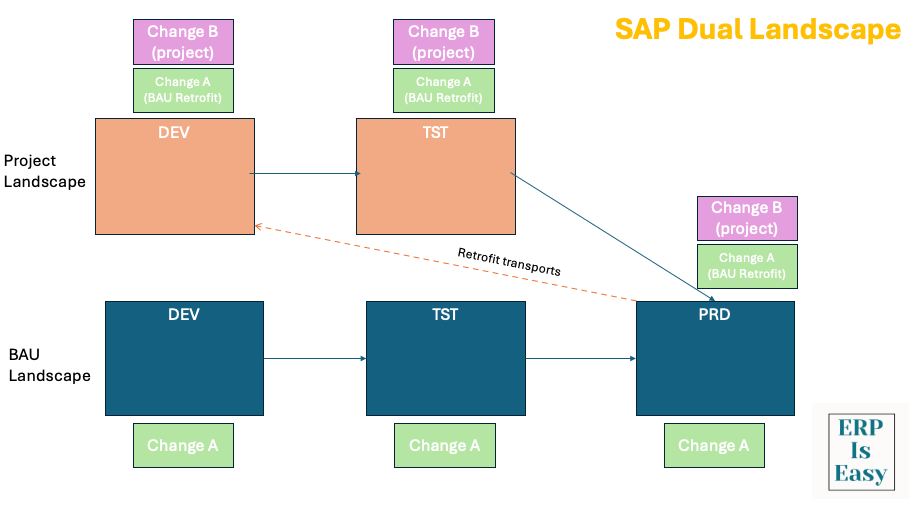
So, the landscape will look something like this. The BAU landscape will have a dev, test and production and the project landscape will have a project dev and project test system. The S/4HANA systems on the project landscape will be an upgraded version of S/4HANA.
Project related changes will be developed in the project development system, moved to the project test system when they are ready to be tested and finally to the production system during the go-live.
The changes that are moved to production from the BAU landscape will be retrofitted into the project landscape. Then finally, when all the testing is completed, the production system will be upgraded to S/4HANA 2023 and the transports will be imported. Then the BAU development and the test system will also be imported and the project transports will be imported into them to keep them all in sync. This is to ensure that all the changes are present in all the SAP systems in the landscape and during the go-live, there won’t be any changes that are missing.
Things to note while managing transports in the SAP landscape:
There are tools available like Charm, Active Control and Rev Trac that are used to create and manage transports including retrofit transports in the project landscape.
While creating retrofit transports, sometimes conflicts arise. When the same object is being changed at both the development system, tools like Charm shows that there is a conflict and the developers need to work together to resolve those conflicts before the changes can be moved across the landscape. If the conflicts are not resolved, then the changes created by one developer will be overwritten by the other change created by another developer when the changes are moved to the production and the system will not work properly.
You should also make sure that all the transports that are imported into the test system and imported into the production system, none of them are left behind and also maintaining the sequence while importing the transports is important.
Only certain people should be able to approve the changes to be moved from Dev to Test and to the production system to ensure control and governance.
Tools like Charm in Solution Manager, Active Control or Rev Trac should be used to ensure the transports are correctly captured, conflicts and downgrade protection warning are resolved properly.
SAP Cloud ALM even though doesn’t have the full retrofit functionality at the moment, SAP has planned to introduce those functionalities early 2026. So going forward, Cloud ALM can also be used to manage transports for S/4HANA systems.
SAP transport and change management is a complicated space and also a very important aspect. So it should be managed properly to ensure the SAP systems are operating effectively and also the projects that you are implementing can go-live without any issues.
I hope this blog was helpful. Please like and share it with your friends who might also benefit from the content. Thank you.

 ERP is Easy
Leave a comment